


Workvivo
4.3118.00 Reviews
App Specs
- Version
- 7.798
- Updated On
- License
- Free
- Downloads
- 1,000,000+
- Developer
- Workvivo
- Categories
- Business
- Platform
- Android, iOS
Screenshots
 Analysis by AppCompare
I judge a workplace communication app less by how lively its feed looks than by whether it helps people find useful information without adding another chore to the day. Workvivo aims to bring company updates, employee conversation and recognition into one shared space. That can be genuinely helpful when a team needs a common place to hear from colleagues, but it works best when the organization gives people a clear reason to open it and keeps the feed worth reading.
My overall take is that Workvivo is most compelling as a home for company-wide communication and a sense of belonging, not as a replacement for every tool a business already uses. I would consider it for an organization whose updates are scattered across email, chats and informal conversations. If a team mainly needs private, rapid back-and-forth, a messaging app may still be the more practical everyday choice.
A social feed with a workplace purpose
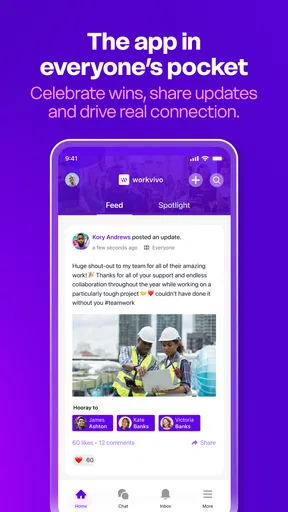
The familiar feed format makes the app easier to approach than a traditional internal portal. Employees can encounter announcements and conversation in a space that invites responses, rather than treating every company message as a one-way notice. That difference matters most when leaders and staff both contribute; a feed can feel welcoming, but it cannot create useful participation on its own.
Workvivo is a business app from developer Workvivo. It is free to download, has a Teen content rating, and is available to people using devices that run Android 9 or later. The current version is 7.731. Its average rating is 4.2 from around 4.3 thousand ratings, and it has over one million installs. Those figures offer a quick sense of its reach, but they do not tell me whether a particular employer has set it up thoughtfully; that is what will shape your day-to-day experience.
Where it can make a real difference
The strongest use case is a company that wants everyday updates to reach people beyond the office or their immediate team. For example, a new employee could use a central feed to keep up with announcements and see what colleagues are discussing, rather than relying on a manager to forward every message. Recognition can also make contributions more visible: a public note of thanks gives coworkers context about someone’s work and lets others join in.
That public visibility is also a useful trade-off to think through. Recognition in a shared feed can help people feel noticed, but not every employee enjoys being praised in front of a large audience. I’d use the format to make appreciation specific and sincere, while leaving room for managers to recognize people privately when that suits them better.
What it can and cannot replace
Compared with email, a social feed is more suited to updates people may want to react to or discuss. Compared with a team chat, it is less naturally suited to urgent, tightly focused exchanges. The distinction is practical: an announcement that should be easy for many employees to find belongs in a shared company space, while a quick question for two coworkers is usually better handled in a direct conversation.
Worth Reading Before You Choose

EA SPORTS FC Mobile 26 Is a Bigger Football Game, but It Takes Time

Flipboard Shows What News Apps Must Do Beyond the Feed

Switching to Android Auto Means Rethinking Your Driving Routine

Google Calendar Makes a Crowded Week Easier to Manage

Ludo King Makes the Most of the Minutes Between Plans

Baby Panda World Brings Quick Play to Modern Phones, but Its Game Library Feels Busy
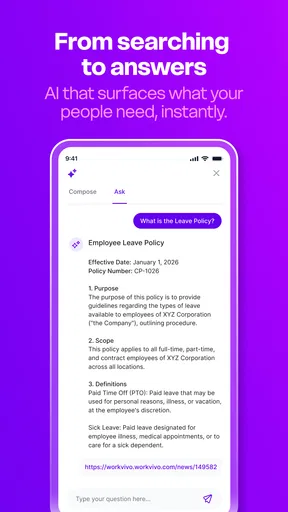
I would not treat an engagement platform as a substitute for a dependable source of formal instructions. If a policy or process must be followed precisely, employees need a clear way to locate the current authoritative version, not merely a post they remember seeing. Before relying on the feed for important notices, I’d agree on what belongs there, who owns those messages and where staff should go when they need to check details later.
It is also worth considering the volume of information. A lively stream can become noisy if every minor update is given the same prominence. Organizations can help by keeping posts purposeful and making it obvious which messages need action, which are simply news and which invite discussion. As an employee, I’d follow the topics that matter to my work and check the feed at a sensible point in the day, rather than feeling obliged to monitor it constantly.
A realistic way to use it
Imagine a colleague who works away from the main office and rarely hears informal news around the break room. They open Workvivo during a morning check-in, read a company announcement, respond to a poll about a proposed team activity and notice a coworker’s achievement. None of those actions needs to become a long session; together, they can help that employee feel connected to people and events they would otherwise miss.
For a manager, the more useful habit is to post with a clear purpose: explain why an update matters, invite a response only when feedback is wanted, and follow up where employees raise questions. A poll is not a substitute for a decision-making process, and a post is not automatically proof that everyone has understood an important change. Used with that in mind, the app can support communication without asking the feed to do more than it can.
Who I’d recommend it to
I can see Workvivo fitting organizations that want employee conversation and company news to feel more approachable, especially where people work across departments or locations. It may also suit teams that want to make everyday recognition visible rather than keeping all appreciation inside manager conversations. The key is having someone responsible for the quality of the shared space: without useful posts and thoughtful participation, employees may have little reason to return.
I’d be more cautious if your team already communicates effectively through a small number of clear channels, or if staff need a simple tool for direct messages and task coordination above all else. Adding another app can increase interruptions instead of reducing them. It is also a poor fit if leadership expects an employee feed alone to repair deeper trust or communication problems; people need credible, responsive communication, not just a new place to publish it.
If you are deciding whether to try it at work, I’d first ask what gap it is meant to fill: company-wide updates, cross-team visibility, recognition or employee feedback. Then agree on what belongs in the feed and how important information will be kept easy to find. That small bit of planning is likely to matter more than asking everyone to post frequently.
For a company looking for a more social home for workplace communication, Workvivo is worth considering. I like its potential to make company news feel less one-sided and recognition more visible, while its value depends heavily on how the organization uses it. I’d recommend it when the goal is connection and shared awareness; I’d keep a chat tool for quick coordination and a clear reference source for formal instructions. That division of roles gives the app room to help without turning it into another all-purpose channel.
If you're like me, always on the lookout for ways to streamline communication and boost employee engagement at work, then Workvivo might be the app you’ve been waiting for. I recently took it for a spin, and I'm here to spill the beans on everything I discovered.
Why Workvivo Stands Out
Picture this: a platform that feels like a social media site but is all about work. That’s Workvivo in a nutshell. It’s designed to make workplace communication as engaging as your favorite social network, which is pretty genius if you ask me. I mean, who wouldn’t want to swap dull emails for vibrant, interactive posts?
Getting Started with Workvivo
Setting up the app was a breeze. After downloading it from the app store, I was greeted with an intuitive interface that made navigation feel like second nature. It’s like the designers knew exactly what I needed before I even realized it myself. The onboarding process was quick, and I was posting updates and sharing company news in no time.
Features That Caught My Eye
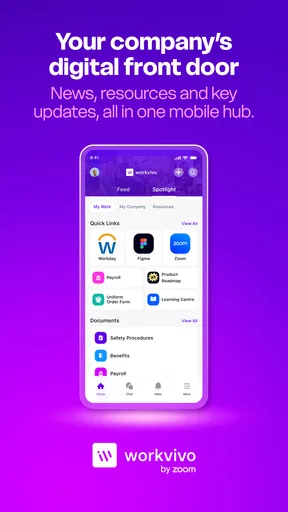
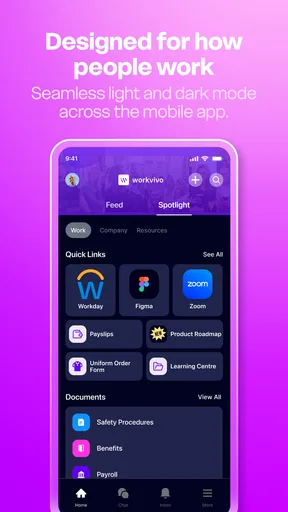
One of the coolest things about Workvivo is its ability to integrate with other tools we already use. Whether it’s Slack, Zoom, or Google Workspace, Workvivo plays nicely with them all. This integration saves a ton of time and keeps everything centralized.
Another feature that wowed me was the recognition functionality. Celebrating achievements and milestones is as easy as liking a post. It’s a great morale booster and gives everyone a chance to shine. Plus, the app allows you to create polls and share feedback, making it super interactive.
What’s the User Experience Like?
Honestly, using Workvivo felt like a breath of fresh air compared to some clunky enterprise software I’ve encountered. The app is smooth, responsive, and packed with features that don’t overwhelm you. The social feed is engaging, with posts, comments, and likes creating a lively community atmosphere.
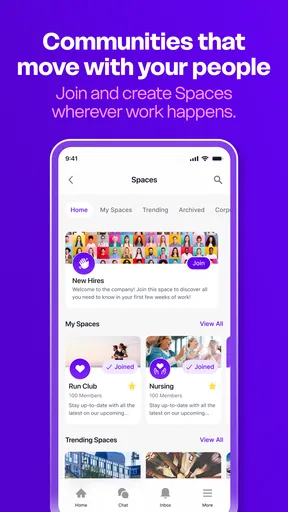
I also loved the personalization aspect. You can customize your profile, follow topics that interest you, and even join groups. It’s these small touches that make the app feel more personal and less like a corporate tool.
How It Enhances Engagement
Workvivo really excels in fostering a sense of community. The app encourages open communication, making everyone feel involved and valued. It’s not just about sharing work updates, but also about building relationships and promoting a positive company culture.
With its focus on engagement, Workvivo helps break down silos and bridges the gap between departments. Whether you’re in HR or IT, everyone has a voice, and that’s incredibly empowering.
Final Thoughts
At the end of the day, Workvivo is more than just an app; it’s a game-changer for workplace communication. It brings people together in an innovative way, making work feel more like a community and less like a chore. If you’re looking to enhance employee engagement and streamline communication, this app is definitely worth a shot.
And there you have it! My take on Workvivo. If you’re curious, I’d say give it a whirl and see how it transforms your workplace. You might just find it’s the missing piece you’ve been searching for.
Pros
- User-friendly interface enhances engagement.
- Seamless integration with existing tools.
- Customizable notifications for updates.
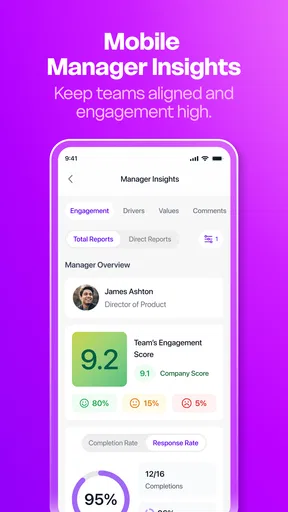
- Robust analytics for management insights.
- Supports multimedia content sharing.
Cons
- Limited offline functionality options.
- Occasional sync issues with calendars.
- Some features require premium upgrade.
- Complex setup for smaller teams.
- Limited third-party app integrations.
FAQs for Workvivo
What is Workvivo and how does it enhance workplace communication?
Workvivo is a comprehensive internal communication platform designed to boost employee engagement by combining traditional communication methods with social media features. It allows users to share updates, recognize achievements, and engage in company-wide discussions, fostering a more connected and informed workplace. It enhances communication by offering a familiar and interactive interface that encourages active participation.
Is Workvivo suitable for businesses of all sizes?
Yes, Workvivo is designed to cater to businesses of various sizes, from small startups to large enterprises. Its scalable features allow companies to adapt the platform to their specific needs, ensuring that all employees, regardless of company size, can benefit from improved communication and engagement tools. The platform's flexibility makes it a versatile choice for diverse organizational structures.
Does Workvivo integrate with other applications and tools?
Workvivo offers seamless integration with a range of popular workplace tools such as Slack, Microsoft Teams, and Google Workspace. These integrations ensure that employees can access all necessary tools within a single platform, streamlining workflows and enhancing productivity. The ability to integrate with existing systems makes Workvivo a convenient addition to any tech stack.
How secure is the Workvivo platform?
Workvivo places a strong emphasis on security, implementing robust measures to protect sensitive company data. The platform utilizes encrypted communication, secure data storage, and regular security audits to ensure that all information remains confidential and protected against unauthorized access. Businesses can trust Workvivo to maintain a high standard of data security.
What kind of customer support does Workvivo provide?
Workvivo offers comprehensive customer support, including a dedicated help center with articles, FAQs, and tutorials to assist users. Additionally, their support team is available for direct contact via email or chat to resolve any issues. Workvivo is committed to providing timely and effective assistance to ensure a smooth user experience.


